Social engineering - The art of Human hacking
Trung Pham Duy - October 2023
Introduction
- Presenter: Trung Pham Duy
- Email: duytrung.tcu@gmail.com
- Slides is published at slides.nauda.dev
Weakest link in cybersecurity systems
- “Humans are the weakest link in cybersecurity systems”
- Unlike technology and processes, people are both predictable and unpredictable .
- They think for themselves and make their own decisions.
- Decisions can be good and other times bad ones, sometimes rational, other times irrational.
Cybercriminals loves chaos
“Adversaries love chaos, and this was a time of chaos.”
- COVID-19 pandemic has shifted a variety of everyday activities onto platforms on the Internet, increase in the presence of people on the Internet is almost never preceded by education about cybersecurity.
- Also, making chilren potential targets for child-specific attacks.
Cybercriminals loves chaos (2)
Covid-19 imposed a wide range of threats in the realm of cybersecurity.
- Economic Hardship
- Fear and Uncertainty
- Remote Healthcare Services
- COVID-19 Themed Scams
Cybercrime, especially Social engineering attacks, increases after the COVID-19 pandemic.
What is SE?
- Social engineering (SE) is a manipulation technique that exploits human error to gain private information, access, or valuables.
“Any act that influences a person to take an action that may or may not be in their best interest” (Christopher Hadnagy, Social Engineering: The Science of Human Hacking. 2nd ed. Hoboken, NJ: Wiley Publishing, 2018).
What is SE? (2)
- SE is a blend of science, psychology, and art. While it is amazing and complex, it is also very simple.
- These “human hacking” scams tend to lure unsuspecting users into
- Exposing data.
- Spreading malware infections.
- Giving access to restricted systems.
What is SE? (3)
- Scams based on social engineering are built around how people think and act.
- SE attacks are especially useful for manipulating a user’s behavior.
- Once an attacker understands what motivates a user’s actions, they can deceive and manipulate the user effectively.
What is SE? (4)
- Hackers also try to exploit a user’s lack of knowledge.
- Thanks to the speed of technology, many consumers and employees aren’t aware of certain threats like drive-by downloads.
Drive by download attacks specifically refer to malicious programs that install to your devices — without your consent.
What is SE? (5)
- Users also may not realize the full value of personal data, like their phone number.
- As a result, many users are unsure how to best protect themselves and their information.
What is SE? (6)
SE Goals
- Sabotage: Disrupting or corrupting data to cause harm or inconvenience.
- Theft: Obtaining valuables like information, access, or money.
How SE work
Most social engineering attacks rely on actual communication between attackers and victims.
The attacker tends to motivate the user into compromising themselves, rather than using brute force methods to breach your data.
How SE work (2) - SE attack cycle
The attack cycle gives these criminals a reliable process for deceiving you.
- Prepare by gathering background information on you or a larger group you are a part of.
- Infiltrate by establishing a relationship or initiating an interaction, started by building trust.
- Exploit the victim once trust and a weakness are established to advance the attack.
- Disengage once the user has taken the desired action.
How SE work (3) - SE attack cycle
This process can take place in:
- A single email
- Over months in a series of social media chats.
- A face-to-face interaction
Beware of social engineering as a means of confusion.
- Few pieces of information can give hackers access to multiple networks and accounts.
How SE work (3) - A common scenario
- By masquerading as legitimate users to IT support personnel, they grab your private details — like name, date of birth or address.
- From there, it’s a simple matter to reset passwords and gain almost unlimited access.
- They can steal money, disperse social engineering malware.
Traits of SE Attacks
- Social engineering attacks center around the attacker’s use of persuasion and confidence.
- When exposed to these tactics, you are more likely to take actions you otherwise wouldn’t.
Traits of SE Attacks (2) - Heightened emotions
- Emotional manipulation gives attackers the upper hand in an any interaction.
- You are far more likely to take irrational or risky actions when in an enhanced emotional state.
Fear, Excitement, Curiosity, Anger, Guilt, Sadness
Traits of SE Attacks (3) - Urgency
- Time-sensitive opportunities or requests are another reliable tool in an attacker’s arsenal.
- You may be motivated to compromise yourself under the guise of a serious problem that needs immediate attention.
- Alternatively, you may be exposed to a prize or reward that may disappear if you do not act quickly.
- Either approach overrides your critical thinking ability.
Traits of SE Attacks (4) - Trust
- Believability is invaluable and essential to a social engineering attack.
- Since the attacker is ultimately lying to you, confidence plays an important role here.
- They’ve done enough research on you to craft a narrative that’s easy to believe and unlikely to rouse suspicion.
Traits of SE Attacks (5) - Trust (2)
- In some cases, attackers use more simplistic methods of social engineering to gain network or computer access.
- For example, a hacker might frequent the public food court of a large office building and “shoulder surf” users working on their tablets or laptops.
- Doing so can result in a large number of passwords and usernames, all without sending an email or writing a line of virus code.
Types of SE Attacks
- Almost every type of cybersecurity attack contains some kind of social engineering. For example, the classic email and virus scams are laden with social overtones.
- Social engineering can impact you digitally through mobile attacks in addition to desktop devices.
Types of SE Attacks (2)
- However, you can just as easily be faced with a threat in-person.
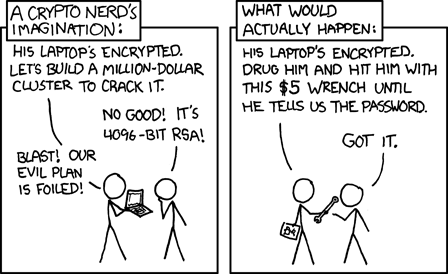
Phishing Attacks
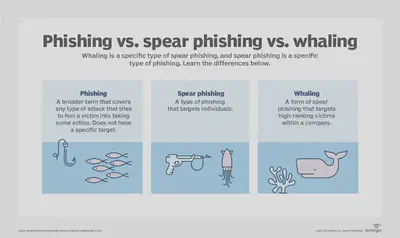
- Phishing attackers pretend to be a trusted institution or individual in an attempt to persuade you to expose personal data and other valuables.
- Spam phishing, or mass phishing, is a widespread attack aimed at many users. These attacks are non-personalized and try to catch any unsuspecting person.
- Spear phishing and by extension, whaling , use personalized info to target particular users.
Phishing Attacks (2)
Phishing Methods - Voice phishing
- Voice phishing (vishing) phone calls may be automated message systems recording all your inputs.
- Sometimes, a live person might speak with you to increase trust and urgency.
Phishing Methods - SMS phishing
- SMS phishing (smishing) texts or mobile app messages might include a web link or a prompt to follow-up via a fraudulent email or phone number.
Phishing Methods - Email phishing
- Email phishing is the most traditional means of phishing, using an email urging you to reply or follow-up by other means. Web links, phone numbers, or malware attachments can be used.
Phishing Methods - Angler phishing
- Angler phishing takes place on social media, where an attacker imitates a trusted company’s customer service team.
- They intercept your communications with a brand to hijack and divert your conversation into private messages, where they then advance the attack.
Phishing Methods - Search engine phishing
- Search engine phishing attempt to place links to fake websites at the top of search results.
- These may be paid ads or use legitimate optimization methods to manipulate search rankings.
Phishing Methods - URL phishing
- URL phishing links tempt you to travel to phishing websites.
- These links are commonly delivered in emails, texts, social media messages, and online ads.
- Attacks hide links in hyperlinked text or buttons, using link-shortening tools, or deceptively spelled URLs.
Phishing Methods - In-session phishing
- In-session phishing appears as an interruption to your normal web browsing. For example, you may see such as fake login pop-ups for pages you’re currently visiting.
Baiting Attacks
- Baiting abuses your natural curiosity to coax you into exposing yourself to an attacker.
- Typically, potential for something free or exclusive is the manipulation used to exploit you.
- The attack usually involves infecting you with malware.
Baiting Methods
- USB drives left in public spaces, like libraries and parking lots.
- Email attachments including details on a free offer, or fraudulent free software.
Physical Breach Attacks
- Physical breaches involve attackers appearing in-person, posing as someone legitimate to gain access to otherwise unauthorized areas or information, most common in enterprise environments, such as governments, army, businesses, or other organizations.
- Attackers may pretend to be a representative of a known, trusted vendor for the company.
- Some attackers may even be recently fired employees with a vendetta against their former employer.
- Attackers may pretend to be a representative of a known, trusted vendor for the company.
Pretexting Attacks
- Pretexting uses a deceptive identity as the “pretext” for establishing trust, such as directly impersonating a vendor or a facility employee.
- This approach requires the attacker to interact with you more proactively. The exploit follows once they’ve convinced you they are legitimate.
Access Tailgating Attacks
- Tailgating , or piggybacking, is the act of trailing an authorized staff member into a restricted-access area. Attackers may play on social courtesy to get you to hold the door for them or convince you that they are also authorized to be in the area.
Quid Pro Quo Attacks
- Quid pro quo is a term roughly meaning “a favor for a favor,”.
- The exploit comes from getting you excited for something valuable that comes with a low investment on your end. However, the attacker simply takes your data with no reward for you.
Dumpster diving attacks
- Dumpster diving is a social engineering attack whereby a person searches a company’s trash to find information, such as passwords or access codes written on sticky notes or scraps of paper, that could be used to infiltrate the organization’s network.
Other attacks
- DNS Spoofing: manipulates your browser and web servers to travel to malicious websites when you enter a legitimate URL.
- Cache Poisoning Attacks specifically infect your device with routing instructions for the legitimate URL or multiple URLs to connect to fraudulent websites.
Other attacks (2)
- Scareware Attacks is a form of malware used to frighten you into taking an action. This deceptive malware uses alarming warnings that report fake malware infections or claim one of your accounts has been compromised.
- Watering Hole Attacks look for existing vulnerabilities that are not known and patched — such weaknesses are deemed zero-day exploits.
Other attacks (3)
- Fax-based phishing.
- Traditional mail malware distribution
Other attacks (4) - Simple unusual attack
- Simple Social Engineering Trick with a phone call and crying baby
Examples - Trojan horse

Examples - Frank Abagnale
- Used various tactics to impersonate at least eight people, including an airline pilot, a doctor and a lawyer.

Examples - Worm Attacks
- The cybercriminal will aim to attract the user’s attention to the link or infected file – and then get the user to click on it.
- The Loveletter worm that overloaded many companies’ email servers in 2000

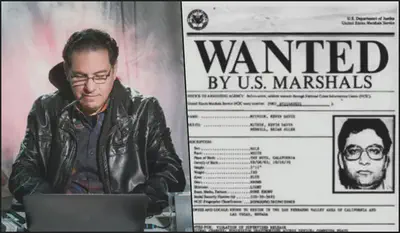
Examples - Kevin Mitnick
- Mitnick called Motorola, then convinced a Motorola employee that he was a colleague and persuaded that worker to send him the source code for the MicroTAC Ultra Lite, the company’s new flip phone.
Examples - RSA Data breach
- An attacker sent two different phishing emails over two days to small groups of RSA employees.
- The emails had the subject line “2011 Recruitment Plan” attaching an Excel file attachment contained malicious code that, once the file was opened, installed a backdoor through an Adobe Flash vulnerability.
- RSA’s SecurID two-factor authentication (2FA) system was compromised, and the company spent approximately $66 million recovering from the attack.
How to spot
- Defending against social engineering requires you to practice self-awareness. Always slow down and think before doing anything or responding.
- Attackers expect you to take action before considering the risks, which means you should do the opposite.
How to spot (2)
Some questions to ask yourself if you suspect an attack:
- Are my emotions heightened?
- Did this message come from a legitimate sender?
- Did my friend actually send this message to me?
- Does the website I’m on have odd details?
- Does this offer sound too good to be true?
- Attachments or links suspicious?
- Can this person prove their identity?
How to Prevent
Beyond spotting an attack, you can also be proactive about your privacy and security. Knowing how to prevent social engineering attacks is incredibly important for all mobile and computer users.
How to Prevent (2) - Safe Communication and Account Management Habits
- Never click on links in any emails or messages.
- Use multi-factor authentication.
- Use strong passwords (and a password manager).
- Avoid sharing names of your schools, pets, place of birth, or other personal details.
- Be very cautious of building online-only friendships.
How to Prevent (3) - Safe Network Use Habits
- Never let strangers connect to your primary Wi-Fi network.
- Use a VPN.
- Keep all network-connected devices and services secure.
How to Prevent (4) - Safe Device Use Habits
- Use comprehensive internet security software.
- Don’t ever leave your devices unsecured in public.
- Keep all your software updated as soon as available.
- Check for known data breaches of your online accounts.
Summary
- Protection against social engineering starts with education.
- If all users are aware of the threats, our safety as a collective society will improve.
- Be sure to increase awareness of these risks by sharing what you’ve learned with your coworkers, family, and friends.