Software and Application multitenancy
Trung Pham Duy - March 2024
Agenda
- SaaS
- Multitenancy
- Benefits
- Disadvantages
- Database approaches
- Application PoV
SaaS
What is SaaS
- Software as a service (SaaS /sæs/) is a software licensing and delivery model in which software is licensed on a subscription basis and is centrally hosted.
Checkout the presentation about
Saas
Multitenancy
What is multitenancy
- Multi-tenant architecture, also known as multitenancy, is a design approach that enables multiple user groups — referred to as tenants — access to one instance of an application or system.
- Much like a building, where various tenants have their own private and secure apartments, but share the same infrastructure.
A common approach to build SaaS solutions
What is a tenants
Tenants can refers to:
- Users and user groups inside your company (departments, teams, individual employees)
- Users and user groups outside your company (vendors, business partners)
- Customers (subscribers or clients) who purchase your product
Tenantis a catch-all term, and teams define what it means to them!
How Does Multi-Tenant Architecture Work?
- Multi-tenant architecture creates distinct, isolated environments within a single physical infrastructure, such as a virtual machine, server, or cloud platform.
- Because every multi-tenant environment is separated from one another, they can be customized to meet the needs of each individual tenant without impacting other environments.
Single-tenant vs Multiple-tenant
| Single-tenant architecture | Multi-tenant architecture |
|---|---|
| Each tenant has a dedicated instance of the application and its resources | Multiple tenants share a single instance of the application and its resources |
| Scaling requires provisioning and managing individual instances for each tenant | Easier scalability as multiple tenants can be accommodated within a single instance |
| More secure due to isolated environments | Security measures involve ensuring data isolation and preventing unauthorized access |
| Less cost-efficient: hardware and software for each user is paid separately | More cost-efficient: thanks to shared infrastructure and platform |
| Independent maintenance and upgrades for each tenant’s instance | Centralized maintenance, updates, and upgrades that apply to all tenants |
| Slower deployment: each tenant requires individual setup and configuration | Faster deployment: new tenants can be added within the existing setup |
Benefits of Multi-tenant Architecture
✔️ Scalability
- With one application being able to serve multiple tenants, companies can easily scale up or down quickly and efficiently without managing multiple dedicated systems.
- This scalability makes it much easier to accommodate seasonal spikes in demand or adjust usage based on customer needs.
✔️ Cost Savings
- Multitenancy allows companies to reduce costs by leveraging shared resources instead of having separate systems dedicated to one tenant at a time.
- This means businesses needn’t invest in additional servers or hardware to meet customer demands, helping to save money in the long run.
✔️ Increased Efficiency
- Multi-tenant architecture increases efficiency by allowing multiple tenants to share resources such as compute power and storage space without sacrificing performance.
- This makes it easier for businesses to manage large workloads without having to invest in additional hardware or software licenses.
✔️ Easy Maintenance/Management
- Multi-tenant architecture is much easier to maintain and manage than single-tenant architecture because all tenants share the same underlying codebase and platform.
- This means businesses don’t have to worry about managing multiple versions of their application across different platforms — they can focus on managing one version across all tenants.
Disadvantages of Multi-tenant Architecture
❌ Security Issues If Incorrectly Implemented
- Poorly implemented multitenancy can lead to issues such as unauthorized access and data misuse.
- Require careful design and management to ensure tenant isolation and secure data storage.
- The most important thing is to authorize the access of end users.
❌ Competing For Limited Resources
With multiple customers using the same system resources and computing power, companies might start suffering from “noisy neighbor” syndrome, where they can’t access the resources they need, and operations slow down.
❌ Migration Difficulty
- While multi-tenant architectures are easy to adapt, they can be hard to leave.
- Migrating data from a multi-tenant environment to any other type of environment can be a challenge because personal data is scattered all over the shared cloud, wherever there’s room for it.
❌ Global Problems And Downtime
By outsourcing data and operations to an external cloud managed by a third-party service provider, companies risk losing access to critical data and information in the case of a technical error. Also, cloud environments are susceptible to downtime; although, it’s minimal with the top providers.
Database approaches on Multitenancy
Database approaches
Data can be physically or virtually isolated.
- Single database, shared schema (DB_1SC)
- Single database, separate schema (DB_nSCs)
- One database per tenant (nDBs)
- Multiple databases, multiple tenants per database, shared schema (nSV_DB_1SC)
1/ Single database, shared schema (DB_1SC)
|
|
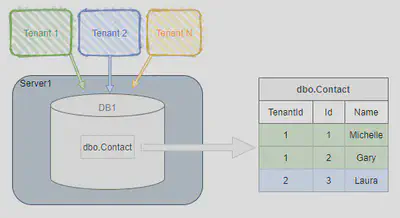
DB_1SC - Security
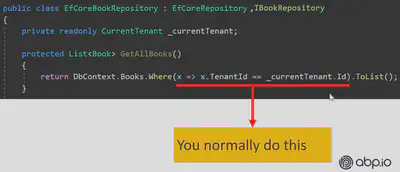
❌ Risk of exposing one tenant’s data to another tenant or updating the wrong tenant’s data (e.g., if a developer misses a WHERE clause to filter on the tenant id)
❌ No tenant isolation
DB_1SC - Maintainability
✔️ One database schema to maintain and a simple schema update rollout process—it only needs to be applied once
✔️ Manage the High Availability/Disaster Recovery/maintenance operation/monitoring strategy for just one database
✔️ Limited development/application code complexity—single schema, single database to connect to
✔️ Adding new tenants is easy—no processes needed around database/schema provisioning or connection determination
❌ Any query or data modification must includes a predicate to restrict the operation to a specific tenant id
❌ Must remember to update the RLS policy as new tables are added over time
❌ Can’t easily restore a single tenant’s data
DB_1SC - Scalability
❌ Limited to scaling-up hardware, rather than scaling out
❌ Risk of “noisy neighbors”—tenants can impact the performance of the system for all others due to a lack of isolation and all competing for the same resources
❌ One-size-fits-all performance tuning and stability—tenants’ data volumes and usage can vary dramatically, impacting things such as execution plans making it more difficult to optimize performance across every tenant
❌ As the number of tenants and data per tenant grows, maintenance activities take longer, potentially impacting all tenants.
2/ Single database, separate schema (DB_nSCs)
- One database to hold the data for all tenants
- Separate tables for each tenant, each set under a tenant-specific schema
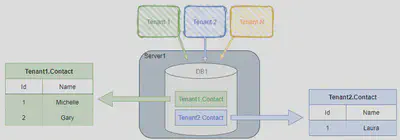
DB_nSCs - Security
✔️ Tenant data has some more isolation (but still within the same database)
✔️ No RLS needed; reduced risk of missing a WHERE clause to limit to specific tenant’s data
❌ Still a risk of querying the incorrect schema (e.g., specifying the schema for an object when it should have instead come from the user account’s default schema—usual best practice is include schema prefixes, which can feel unnatural)
❌ Still limited data isolation
DB_nSCs - Maintainability
✔️ 1 database to manage High Availability/Disaster Recovery/maintenance operation/monitoring strategy for
✔️ Extra scope and control over some tenant-specific maintenance activities
❌ Schema updates more involved, needing to be rolled out to n tenants
❌ Added query complexity: use proper schema
❌ Can’t easily restore a single tenant’s data (although it’s a slightly better process than approach 1 due to isolation of tenant data)
❌ Adding new tenants is more involved as new schemas/user accounts need to be created
❌ As the number of tenants grows, there will be a lot of database objects being created to manage and maintain
DB_nSCs - Scalability
✔️ Data is partitioned into smaller tables, with smaller indexes
✔️ Optimizations could be made at an individual tenant’s schema level
❌ Limited to scaling-up (vertical scaling), rather than scaling out (horizontal scaling)
❌ Risk of “noisy neighbors”—tenants can impact the performance of the system for all others due to limited level of isolation and all competing for the same resources
3/ One Database Per Tenant (nDBs)
Each tenant has their own database
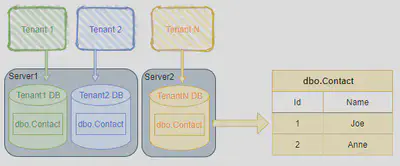
nDBs - Security
✔️ Highest level of tenant isolation, supporting options for shared server and/or isolated servers
❌ Potentially more servers to patch and keep secure
nDBs - Maintainability
✔️ Maintenance jobs can be managed and customized per tenant
✔️ Can easily restore/relocate/clear down a tenant’s data
✔️ No added query complexity
❌ Adding new tenants is more involved, as new schemas need to be created
❌ As the number of tenants grows, there will be more databases being created to manage and maintain
❌ Some added complexity to maintain a registry of tenant-db mappings/application code to determine which connection to use
nDBs - Scalability
✔️ Scale-out and scale-up are both options—tenants can be spread over multiple servers
✔️ Choose to balance between cost (higher tenant density/fewer servers) and performance (lower tenant density/more servers)
✔️ Control over “noisy neighbor” risks
4/ Multiple Databases, Multiple Tenants Per Database, Shared Schema (nSV_DB_1SC)
- Hybrid of approach #1 and approach #3
- A pool of databases exist
- Tenants share a database and schema with other tenants, but are spread over multiple databases
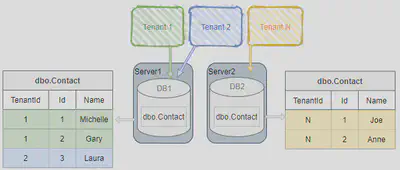
nSV_DB_1SC - Security
✔️ Some tenant isolation possible in general over approach #1
❌ Tenants still share a database and schema with others (same RLS mitigation applies as approach #1)
nSV_DB_1SC - Maintainability
✔️ Choose to balance between overhead of more databases to maintain (lower tenant density) versus fewer (higher tenant density)
✔️ Possible to relocate a tenant’s data (although harder than approach #3)
❌ More maintenance overhead than approach #1
nSV_DB_1SC - Scalability
✔️ Scale-out and scale-up are both options—tenants can be spread over multiple servers
✔️ Choose to balance between cost (higher tenant density/fewer servers) and performance (lower tenant density/more servers)
Application PoV
At first glance
- While you can bring multitenancy into existing applications, it makes it easier to build solutions when multitenancy is considered foundational.
- Multitenancy typically touches every aspect of an application from authentication and authorization, business logic, database schema, and even elements users won’t see like the hosting environment.
Two pillar parties
Parties |
|
An ideal app - 1/ Unaware of multi-tenancy
✔️ Work seamlessly as much as possible!
- You shouldn’t pass
tenantIdto all your controllers, application services, repositories or domain services… - Do all tenancy related stuff in a low level layer and keep your business code clean as much as possible.
An ideal app - 2/ Deployable to on-premise as well
✔️ When a customer/tenant wants to setup your solution to his own servers, you should be doing that without any code changes.
Challenges
- Maintaining application state
- Identifying the Active Tenant
- Data isolation
- Set
tenantIdfor New Entities - DB Connection String Selection
- Database Migration
Hereafter, sample codes are in .NET Core
Curtain - Challenges
- Maintaining application state
- Identifying the Active Tenant
- Data isolation
- Set tenantId for New Entities
- DB Connection String Selection
- Database Migration
1/ Maintaining application state
Application code & services should be stateless!
Where should we save the state?🤔
- HTTP Request (cookie, header, query string, payload)
- Authentication ticket
- Database
- Distributed cache (Redis, Memcached, …)
Curtain - Challenges
- Maintaining application state
- Identifying the Active Tenant
- Data isolation
- Set tenantId for New Entities
- DB Connection String Selection
- Database Migration
2/ Identifying the Active Tenant
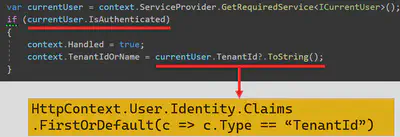
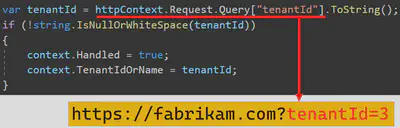
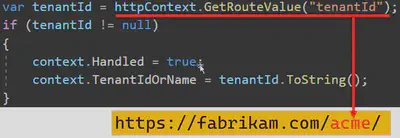
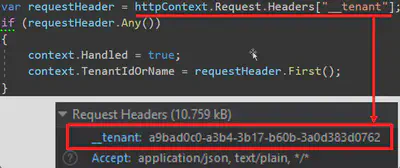
How to determine the current tenant?🤔
CurrentUserTenantResolveContributorQueryStringTenantResolveContributorRouteTenantResolveContributorHeaderTenantResolveContributorCookieTenantResolveContributorDomainTenantResolver
2/ Identifying the Active Tenant - Current User (claims)
2/ Identifying the Active Tenant - Query string
2/ Identifying the Active Tenant - Route
2/ Identifying the Active Tenant - Header
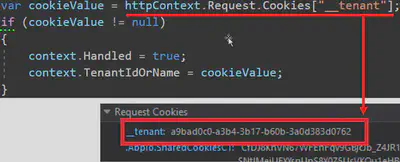
2/ Identifying the Active Tenant - Cookies
Curtain - Challenges
- Maintaining application state
- Identifying the Active Tenant
- Data isolation
- Set tenantId for New Entities
- DB Connection String Selection
- Database Migration
3/ Data isolation - Don’t!
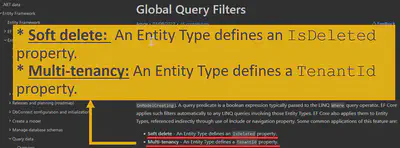
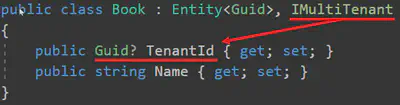
3/ Data isolation - Use Framework feature
Curtain - Challenges
- Maintaining application state
- Identifying the Active Tenant
- Data isolation
- Set tenantId for New Entities
- DB Connection String Selection
- Database Migration
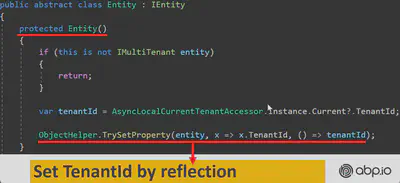
4/ Set tenantId for New Entities
Curtain - Challenges
- Maintaining application state
- Identifying the Active Tenant
- Data isolation
- Set tenantId for New Entities
- DB Connection String Selection
- Database Migration
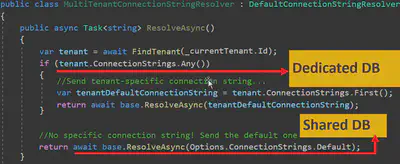
5/ DB Connection String Selection
Curtain - Challenges
- Maintaining application state
- Identifying the Active Tenant
- Data isolation
- Set tenantId for New Entities
- DB Connection String Selection
- Database Migration
6/ DB Migrations - Make DB migration with a custom tool
😊 Easy to implement. All tenants are in the same version
😡 May get too long time for big number of tenants and data
😡 All tenants wait for all upgrade progress
6/ DB Migrations - Run migration on first DB access
😊 Upgrading is distributed to time. A tenant does not wait for another
😡 First user may wait too much and see timeout exception.
😡 Hard to implement (concurrency problems)!
6/ DB Migrations - Make two types application servers
Ideal as upgraded tenants use the new application, other tenants use the old application.
😊 Minimum wait time for a tenant
😊 Upgrading can be scheduled for tenants
😊 Run A/B tests and see bugs before anyone else
😡 Requires multiple app servers
😡 Hard to maintain and monitor