Javadoc comprehensive guide
Trung Pham Duy
What is javadoc?
- javadoc is a tool to generates HTML pages of API documentation from Java source files.
- All modern versions of the JDK provide
javadoc.- JDK 1.4 (JDK 7+ is recommended for the latest version of the Maven Javadoc plugin).
javadoc comments
A special block comment
The Javadoc comments looks very similar to a regular multi-line comment, but the key difference is the extra asterisk (*) at the beginning.
// This is a single line comment

/*
 * This is a regular multi-line comment
 */

/**
 * This is a Javadoc
 */
javadoc format
- Javadoc comments may be placed above any class, method, or field which we want to document.
- These comments are commonly made up of two sections:
- The description of what we’re commenting on, allow HTML
- The standalone block tags (marked with the “@” symbol), which describe specific meta-data
javadoc at class level
/**
* Hero is the main entity we'll be using to . . .
*
* Please see the {@link com.baeldung.javadoc.Person} class for true identity
* @author Captain America
*
*/
public class SuperHero extends Person {
    // fields and methods
}
A short description and two different block tags, standalone and inline:
- Standalone tags appear after the description, with the tag as the first word in a line, e.g., the
@authortag - Inline tags may appear anywhere and are surrounded with curly brackets, e.g., the
@linktag in the description
javadoc at field level
/**
 * The public name of a hero that is common knowledge
 */
private String heroName;
Private fields won’t have Javadoc generated for them unless -private option is explicitly passed to the javadoc command. We’ll learn about javadoc command later.
javadoc at method level
/**
 * <p>This is a simple description of the method. . .
 * <a href="http://www.supermanisthegreatest.com">Superman!</a>
 * </p>
 *
 * @param incomingDamage the amount of incoming damage
 * @return the amount of health hero has after attack
 * @see <a href="http://www.link_to_jira/HERO-402">HERO-402</a>
 * @since 1.0
 */
public int successfullyAttacked(int incomingDamage) {
    // do things
    return 0;
}
@paramprovides any useful description about a method’s parameter or input it should expect@returnprovides a description of what a method will or can return@seewill generate a link similar to the {@link} tag, but more in the context of a reference and not inline@sincespecifies which version of the class, field, or method was added to the project@versionspecifies the version of the software, commonly used with %I% and%G%macros (see next slide).@throwsis used to further explain the cases the software would expect an exception@deprecatedgives an explanation of why code was deprecated, when it may have been deprecated, and what the alternatives are
javadoc @version
Java Software use @version for the SCCS version. The consensus seems to be the following:
%I%gets incremented each time you edit and delget a file- When you create a file,
%I%is set to1.1. When you edit and delget it, it increments to1.2.
- When you create a file,
%G%is the datemm/dd/yy- Some developers omit the date
%G%(and have been doing so) if they find it too confusing – for example, 3/4/96, which%G%would produce for March 4th, would be interpreted by those outside the United States to mean the 3rd of April! 🤨
- Some developers omit the date
/**
 * Example output version
 *
 * @version 1.39, 02/28/97
 */
javadoc generation
javadoc CLI
Assume the classes are all in the src folder in the project directory:
javadoc -d doc src\*
This will generate documentation in a directory called doc, as specified with the –d flag. If multiple packages or files exist, we’d need to provide all of them.
The Javadoc command line tool is very powerful, but has some complexity attached to it.
javadoc with Maven plugin
<build>
    <plugins>
        <plugin>
            <groupId>org.apache.maven.plugins</groupId>
            <artifactId>maven-javadoc-plugin</artifactId>
            <version>3.6.2</version>
            <configuration>
                <source>1.8</source>
                <target>1.8</target>
            </configuration>
            <tags>
            ...
            </tags>
        </plugin>
    </plugins>
</build>
In the base directory of the project, run the command to generate our Javadocs to a directory in target\site:
mvn javadoc:javadoc
The Maven plugin is very powerful, and facilitates complex document generation seamlessly.
java output pages
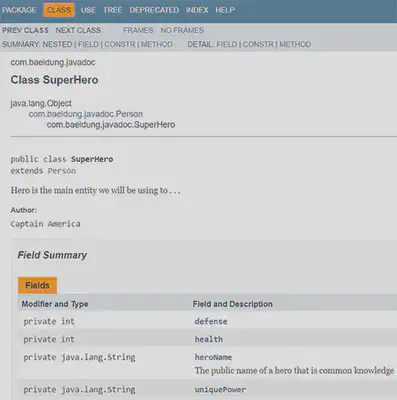 | 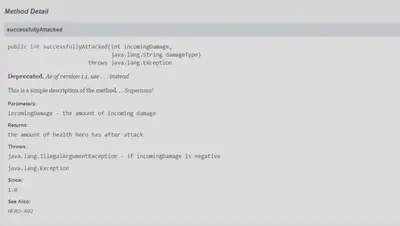 |
Custom javadoc tags
Custom javadoc tags
| CLI | Maven plugin |
|---|---|
| |
Usage | |
javadoc style guide
Descriptions
First Sentence
The first sentence of each doc comment should be a summary sentence, containing a concise but complete description of the API item. This means the first sentence of each member, class, interface or package description.
/**
* Class constructor.
*/
foo() {
...

/**
* Class constructor specifying number of objects to create.
*/
foo(int n) {
...
Implementation-Independence
Write the description to be implementation-independent, but specifying such dependencies where necessary. This helps engineers write code to be “write once, run anywhere.”
- Define clearly what is required and what is allowed to vary across platforms/implementations.
- The use of “On Windows” at the beginning of the sentence makes it clear up front that this is an implementation note.
- Where appropriate, mention what the specification leaves unspecified or allows to vary among implementations.
- Ideally, make it complete enough for conforming implementors.
- Realistically, include enough description so that someone reading the source code can write a substantial suite of conformance tests.
- Basically, the spec should be complete, including boundary conditions, parameter ranges and corner cases.
Automatic re-use of method comments
You can avoid re-typing doc comments by being aware of how the Javadoc tool duplicates (inherits) comments for methods that override or implement other methods. This occurs in three cases:
- When a method in a class overrides a method in a superclass
- When a method in an interface overrides a method in a superinterface
- When a method in a class implements a method in an interface
Use <code> style for keywords and names
- Java keywords
- package names
- class names
- method names
- interface names
- field names
- argument names
- code examples
Method descriptions begin with a verb phrase
A method implements an operation, so it usually starts with a verb phrase:
✔️ Gets the label of this button. (preferred)
❌ This method gets the label of this button.
Class/interface/field descriptions can omit the subject and simply state the object
These API often describe things rather than actions or behaviors:
✔️ A button label. (preferred)
❌ This field is a button label. (avoid)
Use “this” instead of “the” when referring to an object created from the current class
For example, the description of the getToolkit method should read as follows:
✔️ Gets the toolkit for this component. (preferred)
❌ Gets the toolkit for the component. (avoid)
Add description beyond the API name
- The best API names are “self-documenting”, meaning they tell you basically what the API does.
- If the doc comment merely repeats the API name in sentence form, it is not providing more information.
/**
 * ❌ Sets the tool tip text.
 */
public void setToolTipText(String text) {
...
The ideal comment goes beyond those words and should always reward you with some bit of information that was not immediately obvious from the API name.
/**
* ✔️ Registers the text to display in a tool tip. The text
* displays when the cursor lingers over the component.
*/
public void setToolTipText(String text) {
...
Avoid Latin
Prefer:
- “also known as” to “aka”
- “that is” or “to be specific” to “i.e.”
- “for example” to “e.g.”
- “in other words” or “namely” to “viz.”
Be clear when using the term “field”
Be aware that the word “field” has two meanings:
- static field, which is another term for “class variable”
- text field, as in the TextField class. Note that this kind of field might be restricted to holding dates, numbers or any text. Alternate names might be “date field” or “number field”, as appropriate.
Tag convention
Order of tags
Include tags in the following order:
@author(classes and interfaces only, required)@version(classes and interfaces only, required)@param(methods and constructors only)@return(methods only)@exception(@throws is a synonym added in Javadoc 1.2)@see@since@serial(or @serialField or @serialData)@deprecated
Ordering multiple tags
- Multiple
@authortags should be listed in chronological order, with the creator of the class listed at the top. - Multiple
@paramtags should be listed in argument-declaration order. This makes it easier to visually match the list to the declaration. - Multiple
@throwstags (also known as@exception) should be listed alphabetically by the exception names. - Multiple
@seetags should be ordered as follows, which is roughly the same order as their arguments are searched for by javadoc, basically from nearest to farthest access, from least-qualified to fully-qualified, The following list shows this progression.
@see #field
@see #Constructor(Type, Type...)
@see #Constructor(Type id, Type id...)
@see #method(Type, Type,...)
@see #method(Type id, Type, id...)
@see Class
@see Class#field
@see Class#Constructor(Type, Type...)
@see Class#Constructor(Type id, Type id)
@see Class#method(Type, Type,...)
@see Class#method(Type id, Type id,...)
@see package.Class
@see package.Class#field
@see package.Class#Constructor(Type, Type...)
@see package.Class#Constructor(Type id, Type id)
@see package.Class#method(Type, Type,...)
@see package.Class#method(Type id, Type, id)
@see package
Required tags
- An
@paramtag is “required” (by convention) for every parameter, even when the description is obvious. - The
@returntag is required for every method that returns something other than void, even if it is redundant with the method description. (Whenever possible, find something non-redundant (ideally, more specific) to use for the tag comment.).
These principles expedite automated searches and automated processing. Frequently, too, the effort to avoid redundancy pays off in extra clarity.
Tag comments
/**
 * @param ch        the character to be tested
 * @param observer  the image observer to be notified
 * @param x  the x-coordinate, measured in pixels
 * @param x  Specifies the x-coordinate. Measured in pixels.
 */

/**
 * @deprecated  As of JDK 1.1, replaced by
 *              {@link #setBounds(int,int,int,int)}
 */

/**
 * @since 1.2
 */

/**
 * @throws IOException  If an input or output
 *                      exception occurred
 */