JAM Stack with 11ty
Trung Pham Duy - November 2023
11ty
- 11ty - Eleventy is a Node.js static site generator (SSG).
- Simple to start, incremental adoption.
- Fast build.
- Not require a JS framework: zero client-side JS by default.
- Official docs
- Github
Template languages
HTML, Markdown, WebC, JavaScript, Nunjucks, Liquid, Handlebars, Mustache, EJS, HAML, Pug, Custom
Starter project: Create a blog with 11ty
System Requirements
- Node.js >= 14
Site structure
/           -> Home page
/about      -> About page
/blog       -> List of posts page
/blog/:id   -> A single post page
0. Init project
In terminal:
mkdir 11ty-blog && cd 11ty-blog
npm init -y
npm install @11ty/eleventy
Add scripts to package.json:
{
  "scripts": {
    "build": "npx @11ty/eleventy",
    "dev": "npx @11ty/eleventy --serve"
  }
}
1. Home page
At project root, add index.md:
# My personal corner

Powered by 11ty.
In terminal, npm run build. Output is folder _site. In _site/index.html:
<h1>My personal corner</h1>
<p>Powered by 11ty</p>
2. About page
At project root, add about/index.md:
# About me

I love __markdown__!.

> This is a quote I said
Then build. Output:
_site
│   index.html
└───about
        index.html
3. Init Git
In terminal:
git init
At project root, add a .gitignore file:
node_modules
_site
Then commit.
4. Layout
At project root, add _includes/layout.njk (Nunjucks):
<!DOCTYPE html>
<html lang="en">
<head>
  <meta charset="UTF-8">
  <meta http-equiv="X-UA-Compatible" content="IE=edge">
  <meta name="viewport" content="width=device-width, initial-scale=1.0">
  <link rel="stylesheet" href="https://unpkg.com/sakura.css/css/sakura.css" type="text/css">
  <!-- Grab title from the page data and dump it here -->
  <title>{{ title }}</title>
</head>
<body>
  <!-- Grab the content from the page data, dump it here, and mark it as safe -->
  <!-- Safe docs: https://mozilla.github.io/nunjucks/templating.html#safe -->
  {{ content | safe }}
</body>
</html>
4. Layout (cont)
Add Frontmatter to the top of markdown files.
# index.md
---
layout: layout.njk
title: Homepage | My Blog
---
Now npm run dev. Dev server hosted at http://localhost:8080/.
5. First blog post
Add blog/what-is-a-cdn.md:
---
layout: layout.njk
title: What is a CDN
tags: ['blog', 'cdn']
---

# What is a CDN

[Source](https://www.cloudflare.com/learning/cdn/what-is-a-cdn/)

A content delivery network (CDN) is a geographically distributed group of servers that caches content close to end users.
6. List all blog posts
Add blog/index.njk:
---
layout: layout.njk
---

<h1>My blog</h1>

<ul>
{% for post in collections.blog %}
  <li><a href="{{ post.url }}">{{ post.data.title }}</a></li>
{% endfor %}
</ul>
7. Add site header
At _includes/layout.njk, after <body>:
<header>
  <nav>
    <ul>
      <li><a href="/">Home</a></li>
      <li><a href="/about">About</a></li>
      <li><a href="/blog">Blog</a></li>
    </ul>
  </nav>
</header>
8. Second blog post
Add blog/webdev/css-intro.md:
---
layout: layout.njk
title: "CSS: Cascading Style Sheets"
tags: ['blog', 'css']
---

# CSS: Cascading Style Sheets

[Source](https://developer.mozilla.org/en-US/docs/Web/CSS)

Cascading Style Sheets (CSS) is a stylesheet language used to describe the presentation of a document written in HTML or XML (including XML dialects such as SVG, MathML or XHTML).

CSS describes how elements should be rendered on screen, on paper, in speech, or on other media.
9. Add CSS file
At root, create css/styles.css:
nav > ul {
  margin: 0;
  padding: 0;
  list-style: none;
  display: flex;
  gap: 1rem;
}
Add to _includes/layout.njk’s <head>
<link rel="stylesheet" href="/css/styles.css" type="text/css">
9. Add CSS file (cont)
At root, add .eleventy.js:
module.exports = function (eleventyConfig) {
  eleventyConfig.addPassthroughCopy('css/styles.css');
  return {
    passthroughFileCopy: true,
  };
};
Restart dev server.
Tools
Front Matter
Front Matter Format
Metadata normally at the top of template files.
---
title: My page title
---
The above is using YAML syntax.
As 11ty uses gray-matter to parse Front Matter, use can use other formats like json and JS Objects as well.
Front Matter in JSON
---json
{
  "title": "My page title"
}
---
<!doctype html>
<html>
...
Front Matter in JS Object
---js
{
  title: "My page title",
  currentDate: function() {
    // You can have a JavaScript function here!
    return (new Date()).toLocaleString();
  }
}
---
<h1>{{ title }}</h1>
<p>Published on {{ currentDate() }}</p>
Front Matter - permalink
permalink: Change the output target of the current template.
# Map to new path
permalink: "this-is-a-new-path/subdirectory/testing/index.html"

# skip writing file
permalink: false

# with template syntax
permalink: "subdir/{{ title | slugify }}/index.html"
Front Matter - layout
layout: Wrap current template with a layout template found in the_includesfolder.
# _includes/layout.njk
layout: layout.njk

# _includes/default/layout.njk
layout: default/layout.njk
Front Matter - pagination
pagination: Enable to iterate over data. Output multiple HTML files from a single template.
Front Matter - tags
tags: A single string or array that identifies that a piece of content is part of a collection. Collections can be reused in any other template.
Front Matter - date
date: Override the default date (file creation) to customize how the file is sorted in a collection.
Front Matter - eleventyComputed
eleventyComputed: Programmatically set data values based on other values in your data cascade.
Front Matter - All special keys
Global Data
What is Global Data
Global data is exposed to every template in an Eleventy project, can be either:
- Global data files: JSON and JavaScript files placed inside of the global data folder.
- Declared in 11ty config file (from v1.0.0).
Global Data files
- Global data folder is placed inside dir.input configuration option (
.by default), and the name of the global data folder is dir.data configuration option (_databy default). - All
*.jsonandmodule.exportsvalues from*.jsfiles in this folder will be added into a global data object available to all templates.
Practice: Header as Global data
Use global data file
Create _data/header.json:
[
  {
    "url": "/",
    "label": "Home"
  },
  {
    "url": "/about",
    "label": "About"
  },
  {
    "url": "/blog",
    "label": "Blog"
  }
]
Use global JSON data file (cont)
In _includes/layout.njk, replace header>nav>ul’s content with:
{% for item in header %}
  <li><a href="{{item.url}}">{{item.label}}</a></li>
{% endfor %}
As you can see, header magically appears as global variable inside template files.
Use 11ty config file
In .eleventy.js:
module.exports = function (eleventyConfig) {
  //...other code

  eleventyConfig.addGlobalData("header", [
    {
      "url": "/",
      "label": "Home"
    },
    {
      "url": "/about",
      "label": "About"
    },
    {
      "url": "/blog",
      "label": "Blog"
    }
  ]);

  //...other code
};
Remote global data
Global data can come from other services. Add _data/posts.js.
npm install ofetch
const { ofetch } = require('ofetch');
module.exports = async function () {
  const url = 'https://jsonplaceholder.typicode.com/posts';
  return ofetch(url);
};
Of course, you can use any HTTP client: axios, ky, node-fetch…
Remote global data (cont)
Add posts/index.njk.
---
title: Homepage | My blog
layout: layout.njk
---

<h1>My blog</h1>
<p>
Powered by 11ty.
</p>

<ul>
{% for post in posts %}
  <li>
    {{ post.title }}
  </li>
{% endfor %}
</ul>
Remote global data (cont)
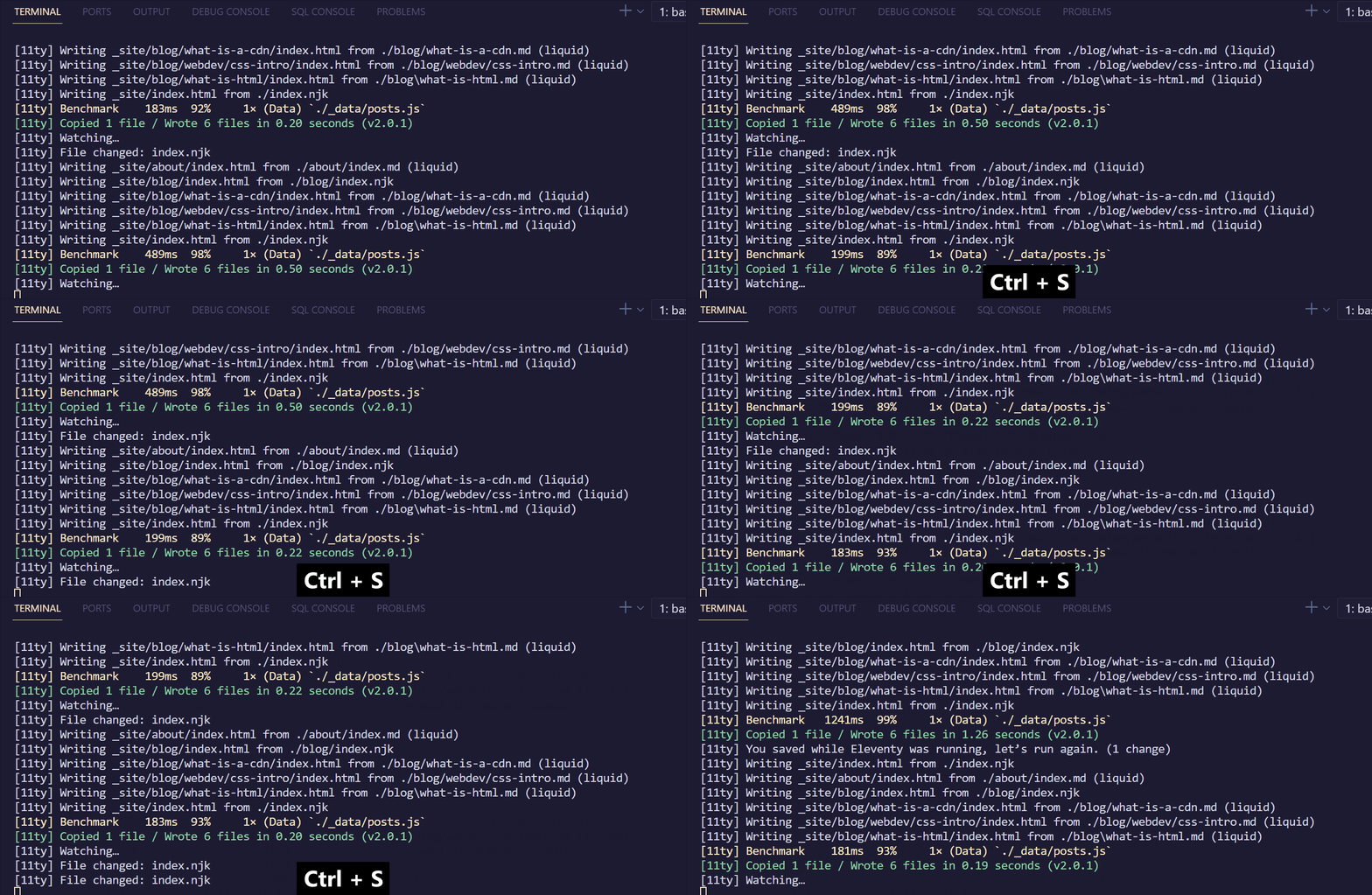
In dev, every time you hit save, API is called 😭.
Remote global data (cont)
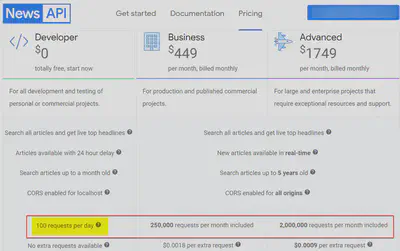
API quota will run out soon 💀.
Plugins
Plugins in 11ty
Plugins are custom code that Eleventy can import into a project from an external repository.
Cache API using plugin Fetch
- Fetch network resources and cache them so you don’t bombard your API (or other resources).
- Do this at configurable intervals — not with every build!
- Once per minute, or once per hour, once per day, or however often you like!
Plugin Fetch usage
npm install @11ty/eleventy-fetch
In _data/posts.js.
const EleventyFetch = require('@11ty/eleventy-fetch');

module.exports = async function () {
  const url = 'https://jsonplaceholder.typicode.com/posts';
  return EleventyFetch(url, {
    duration: '1m', // save for 1 minute
    type: 'json', // we’ll parse JSON for you
  });
};
Plugin Fetch usage (cont)
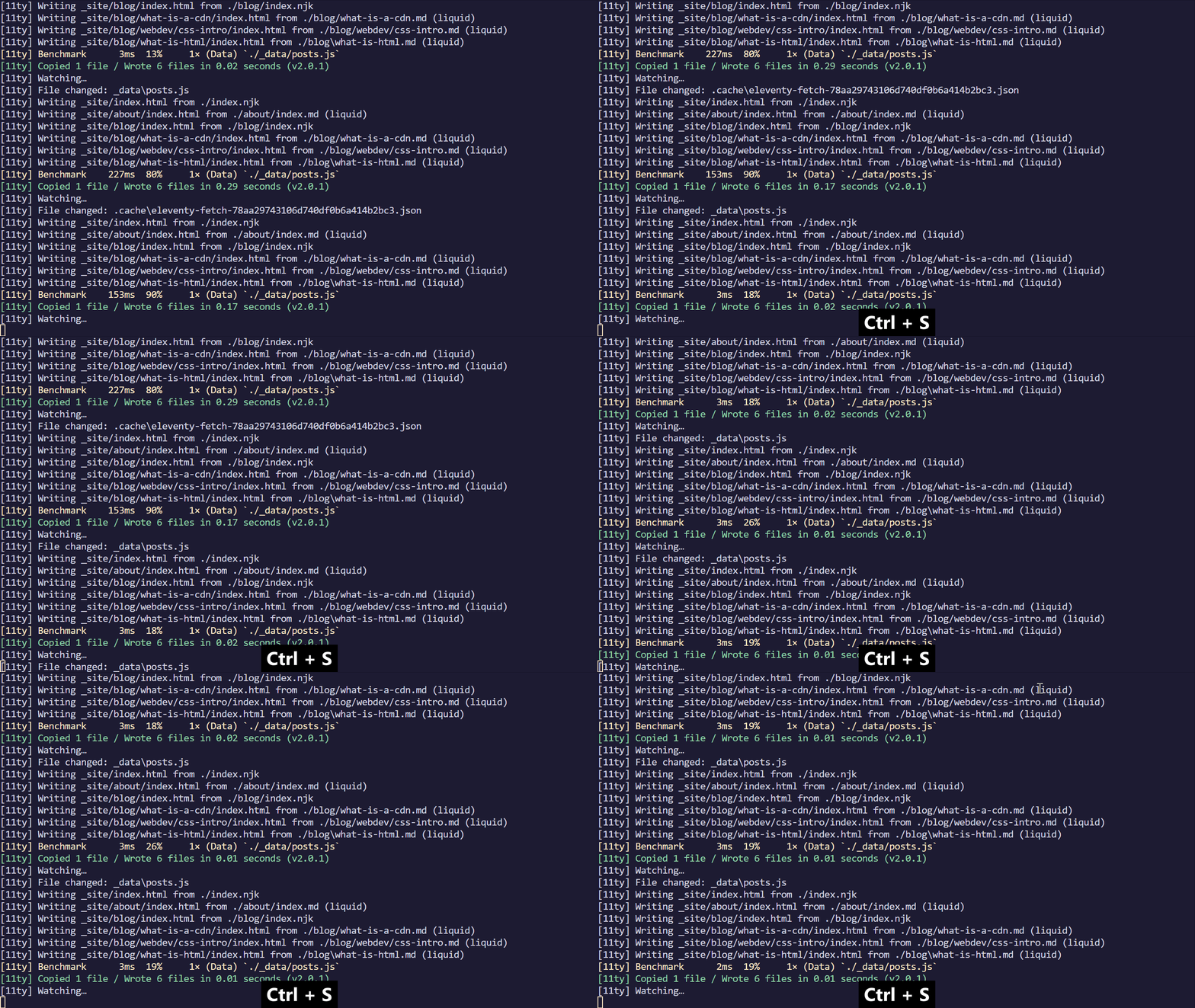
API is only called when cache is stale (> 1 minute).
Notable official plugins
- Navigation: creating infinite-depth hierarchical navigation.
- Image: low level utility to perform build-time image transformations for both vector and raster images.
- I18n: manage pages and linking between localized content.
- RSS: generating an RSS feed (actually an Atom feed, but who’s counting) using the Nunjucks templating engine.
Pagination
Paginate posts
Each page with size=5. At posts/index.njk.
---
title: Posts
layout: layout.njk
pagination:
  data: posts
  size: 5
permalink: "/posts/{{ pagination.pageNumber }}/index.html"
---

<h1>Posts</h1>

<ul>
{% for item in pagination.items %}
<li>
  <a href="/posts/{{ item.title | slugify }}">
  {{ item.title }}
  </a>
</li>
{% endfor %}
</ul>
pagination.pageNumberstarts from 0.
Add pagination navigation
<nav aria-labelledby="my-pagination">
  <ul>
    <li>{% if page.url != pagination.href.first %}<a href="{{ pagination.href.first }}">First</a>{% else %}First{% endif %}</li>
    <li>{% if pagination.href.previous %}<a href="{{ pagination.href.previous }}">Previous</a>{% else %}Previous{% endif %}</li>
{%- for pageEntry in pagination.pages %}
    <li><a href="{{ pagination.hrefs[ loop.index0 ] }}"{% if page.url == pagination.hrefs[ loop.index0 ] %} aria-current="page"{% endif %}>{{ loop.index }}</a></li>
{%- endfor %}
    <li>{% if pagination.href.next %}<a href="{{ pagination.href.next }}">Next</a>{% else %}Next{% endif %}</li>
    <li>{% if page.url != pagination.href.last %}<a href="{{ pagination.href.last }}">Last</a>{% else %}Last{% endif %}</li>
  </ul>
</nav>
Make first page at 1
Change permalink.
permalink: "/posts/{% if pagination.pageNumber > 0 %}page-{{ pagination.pageNumber + 1 }}/{% endif %}index.html"
Generate post detail page
Create posts/$slug.njk (file name is not important, file extension is important).
---
pagination:
    data: posts
    size: 1
    alias: post
permalink: "posts/{{ post.title | slugify }}/"
eleventyComputed:
  title: "{{ post.title }}"
layout: layout.njk
---

<h1>{{ title }}</h1>

{{ post.body }}
Eleventy Supplied Data
Eleventy Supplied Data
pkg: project’spackage.jsonvalues.pagination: when enabled using pagination in front matter.collections: Lists of all of your content, grouped by tags.page: Has information about the current page.eleventy: contains Eleventy-specific data from environment variables and the Serverless plugin (if used).
Partials
Template include
includepulls in other templates in place. It’s useful when you need to share smaller chunks across several templates that already inherit other templates.- Paths are relative to
_includesfolder.
Practice: header partial
Create _includes/partials/header.njk:
<header>
  <nav>
    <ul>
      {% for item in header %}
        <li>
          <a href="{{ item.url }}">{{ item.label }}</a>
        </li>
      {% endfor %}
    </ul>
  </nav>
</header>
Practice: header partial (cont)
In _includes/layout.njk:
...
<body>
  {% include "partials/header.njk" %}}
  <!-- Grab the content from the page data, dump it here, and mark it as safe -->
  <!-- Safe docs: https://mozilla.github.io/nunjucks/templating.html#safe -->
  {{ content | safe }}
</body>
...
Collections
Collections Using Tags
- A collection allows you to group content in interesting ways.
- A piece of content can be a part of multiple collections, if you assign the same string value to the
tagskey in the front matter. tagshave a singular purpose in Eleventy: to construct collections of content.- Some other platforms use tags to refer to a hierarchy of labels for the content.
- A piece of content can be a part of multiple collections, if you assign the same string value to the
How to tags
---
# single tag
tags: cat
# access in template: `collections.cat`

# multiple words in a single tag
tags: cat and dog
# access in template: `collections['cat and dog']`

# multiple tags, single line
tags: ['cat', 'dog']
# or multiple tags, multiple lines
tags:
  - cat
  - dog
# content would show up in: `collections.cat`, `collections.dog`
---
The Special all Collection
By default Eleventy puts all of your content (independent of whether or not it has any assigned tags) into the collections.all Collection.
This allows you to iterate over all of your content inside of a template.
Exclude from collections
---
eleventyExcludeFromCollections: true
tags: post
---
This will not be available in collections.all or collections.post.
Collection Item Data Structure
{
  page: {
    inputPath: './test1.md',
    url: '/test1/',
    date: new Date(),
    // … and everything else in Eleventy’s `page`
  },
  data: { title: 'Test Title', tags: ['tag1', 'tag2'], date: 'Last Modified', /* … */ },
  content: '<h1>This is my title</h1>\n\n<p>This is content…'
}
<ul>
{%- for post in collections.post -%}
  <li>{{ post.data.title }}</li>
{%- endfor -%}
</ul>
Sorting Ascending
The default collection sorting algorithm sorts in ascending order using:
- The input file’s Created Date (you can override using date in front matter, as shown below)
- Files created at the exact same time are tie-broken using the input file’s full path including filename
Sort Descending
<!-- nunjucks -->
<ul>
{%- for post in collections.post | reverse -%}
  <li>{{ post.data.title }}</li>
{%- endfor -%}
</ul>
Advanced: Custom Filtering And Sorting
module.exports = function(eleventyConfig) {
  // Filter source file names using a glob
  eleventyConfig.addCollection("posts", function(collectionApi) {
    return collectionApi.getFilteredByGlob("_posts/*.md");
  });
};
Template & Directory Specific Data Files
Template & Directory Specific Data Files
- While you can provide global data files to supply data to all of your templates, you may want some of your data to be available locally only to one specific template or to a directory of templates.
- For that use, we also search for JSON and JavaScript Data Files in specific places in your directory structure.
Template & Directory Data Files Search Locations
Consider a template located at posts/subdir/my-first-blog-post.md.
Eleventy will look for data in the following places (starting with highest priority, local data keys override global data):

1. Content Template Front Matter Data
- merged with any Layout Front Matter Data

2. Template Data File
posts/subdir/my-first-blog-post.11tydata.js
posts/subdir/my-first-blog-post.11tydata.json
posts/subdir/my-first-blog-post.json

3. Directory Data File
posts/subdir/subdir.11tydata.js
posts/subdir/subdir.11tydata.json
posts/subdir/subdir.json

4. Parent Directory Data File
posts/posts.11tydata.js
posts/posts.11tydata.json
posts/posts.json

5. Global Data Files in _data/* (.js or .json files) available to all templates.
Practice: default layout and tags for Blog
Create blog/blog.json.
{
  "layout": "layout.njk",
  "tags": "blog"
}
Themes and Starter projects
Starter projects
Choose a repo, clone, then customize and add content.